Disclosure: As an Amazon Associate, we earn from qualifying purchases. If you buy through links on this page, we may earn a small commission at no extra cost to you.
By Editorial Team | Updated October 8, 2026
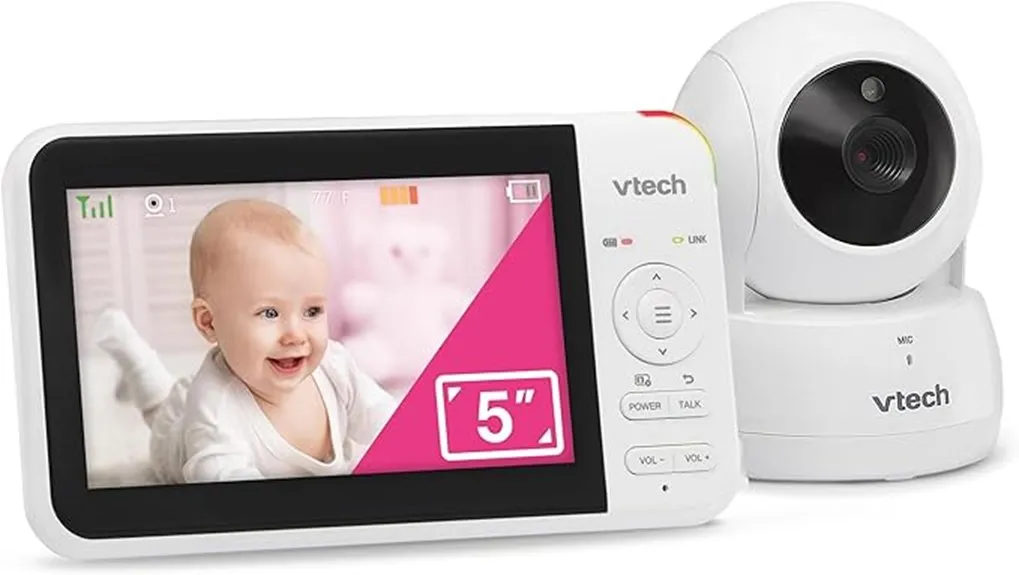
The VTech Baby Monitor VM924 is a non-WiFi video monitor with a 5-inch color screen, remote pan-and-tilt camera, automatic infrared night vision, and a rechargeable parent unit. VTech advertises up to 17 hours of video monitoring and 31 hours in audio-only mode, making battery life one of its biggest selling points.
It is designed for parents who want a dedicated screen without depending on a smartphone app or internet connection. However, its 480 × 272 display is not HD, the camera needs constant power, and the advertised 1,000-foot range depends on your home’s layout. Here is how those trade-offs affect everyday use.
Quick Verdict: VTech VM924
Editorial rating: 8/10 (Specification-based assessment, not hands-on testing)
Best for: Parents who want straightforward home monitoring, a separate handheld display, and long advertised battery life.
Skip if: You need smartphone viewing, recording, a high-definition display, or a completely cordless camera.
Bottom line: The VM924 is a practical choice for basic video and audio monitoring. Its convenience and camera controls are more compelling than its picture resolution.
Before You Buy
- The screen is not HD: Its documented resolution is 480 × 272 pixels.
- The camera plugs into an outlet: Only the parent display has a built-in rechargeable battery.
- There is no remote phone access: You cannot use the VM924 to check your nursery from outside its direct wireless range.
- Camera placement matters: Keep the camera and its power cord at least 3 feet from the crib or any area your baby can reach.
Jump to Review Sections
Key Takeaways
- The VTech VM924 combines a 5-inch LCD viewer with remote camera movement, digital zoom, and automatic infrared night vision.
- Its 2,600mAh rechargeable parent-unit battery is rated for up to 17 hours of video or 31 hours of audio-only monitoring.
- A direct digital wireless connection works without household WiFi, although it does not guarantee complete protection against interception.
- The temperature display helps you track room conditions, but it cannot confirm that a baby is sleeping safely.
- Two-way talk, lullabies, soothing sounds, sound activation, and visual sound indicators make the monitor useful for everyday routines.
- The main limitations are modest screen resolution, no smartphone access, and a camera that requires AC power.
VTech VM924 Specifications and Essential Features
The VTech VM924 combines a portable parent screen with a motorized nursery camera. Its key advantage is having useful monitoring controls on a dedicated device rather than depending on your phone.
The camera supports remote horizontal and vertical movement, allowing you to change the view without entering the nursery. The display is large enough for basic checks, although its resolution is lower than that of many HD monitors.
VTech VM924 Specifications
| Specification | VTech VM924 |
|---|---|
| Display | 5-inch color LCD |
| Screen resolution | 480 × 272 pixels (WQVGA) |
| Camera movement | 360° panoramic pan, 132° vertical viewing range |
| Digital zoom | Up to 2×, according to VTech |
| Parent-unit battery | 2,600mAh rechargeable lithium-ion |
| Claimed video runtime | Up to 17 hours |
| Claimed audio-only runtime | Up to 31 hours |
| Advertised wireless range | Up to 1,000 feet under suitable conditions |
| Connection | Direct digital wireless, no WiFi required |
| Night vision | Automatic infrared |
| Audio features | Two-way talk, lullabies, soothing sounds |
| Additional monitoring | Room temperature, sound activation, sound indicators |
| Camera power | AC adapter |
| Limited warranty | One year, subject to VTech’s terms |
What’s Included in the Box?
According to VTech’s US product documentation, the standard VM924 package includes:
- One parent unit with a 5-inch LCD display
- One motorized baby camera
- Two AC power adapters
- Wall-mounting screws and anchors
- A quick-start guide
The parent unit contains a rechargeable battery. The nursery camera uses its power adapter, so you must position it near a suitable outlet while keeping the cord away from the sleeping area.
Who Should Buy the VM924?
The VM924 makes sense if you mainly want to check whether your baby is awake, hear crying, or look around the room without using your phone. Its dedicated display also avoids interruptions from mobile notifications.
It is less suitable if you need to monitor from work, share a live feed with a caregiver outside the home, record video, or see fine details on an HD screen.
How Secure Is the VTech VM924 Without WiFi?
The VTech VM924 connects its camera directly to the parent unit, without relying on a home internet connection. That removes common WiFi-camera concerns involving online accounts, remote app access, and cloud services.
Its digital wireless system operates locally. The important distinction is that no WiFi does not mean zero security risk. The lack of internet access reduces one category of exposure, but wireless transmission should never be described as impossible to intercept.
The original product description refers to encrypted FHSS technology. However, the specific encryption implementation was not established from the official documentation reviewed. It is more accurate to describe the VM924 as a direct digital, non-WiFi monitor.
Can Someone Watch Through a Phone App?
No. The standard VM924 does not provide smartphone viewing or remote internet access. You see and hear the nursery through its compatible parent unit.
This is convenient if you want a simple monitoring system, but it also means you cannot check the nursery from another city or while away from home.
How Good Is the Camera and Night Vision?
The camera automatically switches to infrared night vision as lighting decreases. This lets you see your baby in a darkened room without leaving a bright light on.
Night vision is intended for basic monitoring, not detailed medical observation. The 480 × 272 screen also limits the detail available, especially when you use digital zoom.
The camera’s motorized movement helps compensate for a narrow initial view. You can pan across the room or tilt to look toward another part of the crib, provided the camera is safely positioned.
Safety reminder: A video baby monitor does not prevent sudden infant death syndrome (SIDS) and cannot replace safe-sleep practices or responsible supervision. Keep the sleep surface firm, flat, and free of loose bedding and soft objects.
How Useful Is the VM924 Temperature Sensor?
The VM924 includes a temperature sensor that displays the nursery’s room temperature on the parent unit. This helps you notice changes without entering the room repeatedly.
You can use the reading as a guide when adjusting heating, cooling, or your baby’s clothing. The monitor’s menu also provides temperature-related settings and alerts.
However, the sensor measures the surrounding room environment, not your baby’s body temperature. A displayed number cannot guarantee that your baby is comfortable or sleeping safely.
What Should Parents Watch For?
The American Academy of Pediatrics advises avoiding overheating. Signs that a baby may be too warm include sweating, a hot chest, or flushed skin.
Use the temperature display alongside direct observation and appropriate clothing. For additional guidance, see the American Academy of Pediatrics’ safe-sleep advice.
VTech VM924 Two-Way Talk, Lullabies, and Sound Controls
The VM924 offers several useful audio features beyond simply hearing your baby. Two-way communication lets you speak through the nursery camera, while built-in lullabies and ambient sounds can be played from the baby unit.
Two-Way Talk
Press and hold the TALK button on the parent unit to speak through the camera’s speaker. Release it to return to listening.
This feature may help reassure an older baby who responds to your voice. However, it will not replace entering the room when your child needs feeding, changing, or physical comfort.
Lullabies and Soothing Sounds
VTech provides five melodies and selectable soothing audio, including white noise and nature-inspired sounds. You control playback through the parent unit’s menu.
The monitor also includes options for automatic playback timing. These features are convenient if you prefer not to use a separate sound machine.
Sound Activation and Visual Alerts
The VM924 includes sound activation, sometimes called VOX. You can set the parent display to wake when the nursery microphone detects sound above a selected sensitivity level.
A three-level sound indicator also gives you a visual cue about nursery noise. This can be useful when the parent unit’s volume is low.
Because sensitivity changes which sounds trigger the screen, test the settings before relying on them overnight.
VTech VM924 Range and Connectivity: What to Expect
VTech advertises a maximum wireless range of up to 1,000 feet for the VM924. That figure describes favorable transmission conditions, not a guarantee of performance across an entire property.
Walls, floors, building materials, and electronic interference can shorten the usable distance. Actual coverage varies between homes, especially across multiple stories.
Will It Work Through Walls?
The VM924 is designed for normal use around a home, including movement between rooms. However, thick concrete, metal structures, and other obstacles may reduce signal quality.
For a multi-story house, check the connection in the bedroom, kitchen, living room, and any outdoor area where you plan to use the monitor.
Can You Use It in the Backyard?
Potentially, yes. If your backyard is within the monitor’s usable wireless range, the parent unit can continue receiving video and audio without WiFi.
Do not assume the maximum advertised range applies indoors or outdoors at your home. Test the connection before depending on it.
What Happens if the Connection Drops?
A weak or lost connection can interrupt your view of the nursery. If you experience signal trouble, first move the parent unit closer to the camera.
VTech also advises keeping the monitor away from electronic equipment that may cause interference. A connection issue does not necessarily mean the camera is defective.
How to Set Up the VTech VM924 Baby Monitor
Setup is straightforward because the standard VM924 uses a dedicated camera-to-monitor connection. You do not need to create an online account, install an app, or connect to a router.
Step-by-Step Setup
- Choose a safe camera location. Place the camera on a stable surface or install it using the approved wall-mounting instructions. Keep the camera and cord at least 3 feet from the crib and away from your child’s reach.
- Connect the camera. Use its supplied AC adapter and a suitable wall outlet.
- Charge the parent unit. VTech’s US quick-start guide recommends charging the parent unit for 12 hours before first use.
- Turn on both devices. Switch on the baby camera, then press and hold the parent unit’s power button.
- Check the video connection. Wait for the parent display to show the camera image and verify that sound is reaching the unit.
- Adjust the camera view. Use the parent unit’s directional controls to position the view toward the sleeping area.
- Test the audio. Check volume, sound sensitivity, two-way talk, and connection reliability before regular use.
Safe Camera Installation
The US Consumer Product Safety Commission recommends keeping baby monitor cords at least 3 feet from any part of a crib, bassinet, or play yard. This applies to wall-mounted cameras as well as cameras placed on furniture.
Never put the camera inside a crib or attach a powered camera where your child can reach its cable. See the CPSC baby monitor cord warning for the reason behind this requirement.
Best Uses for the VM924
Bedroom and Nursery Monitoring
The dedicated screen makes sense for checking a sleeping child from another room. Infrared night vision and sound activation are particularly useful during nighttime monitoring.
Moving Around the House
The rechargeable parent unit can travel with you while the camera remains plugged in. This gives you flexibility when doing household tasks within the usable signal range.
Travel and Overnight Visits
The system can be used away from home when suitable electrical power and safe camera placement are available. You do not need guest WiFi, although the camera and parent unit still need their appropriate charging and power arrangements.
VTech VM924 Pros and Cons
The VM924’s strengths are simplicity, local monitoring, and long advertised parent-unit battery life. Its weaknesses mainly concern display detail and the limitations of a dedicated, non-internet system.
Pros
- Large 5-inch dedicated display
- Up to 17 hours of claimed video runtime
- Remote pan, tilt and digital zoom
- No Wi-Fi or app required
Cons
- 480 × 272 display is not HD
- Camera requires a wall outlet
- No viewing from a smartphone
If you value screen resolution above battery endurance, an HD monitor deserves a closer look. But if you mainly want a direct view of your nursery without managing a phone app, the VM924’s feature set is useful.
What Owners Report About the VTech VM924
Public owner discussions give a more mixed picture than the product specifications alone. Several VM924 owners describe its straightforward setup, dedicated screen, and sound-activated mode as useful features.
Commonly Mentioned Positives
- Simple operation: Some parents appreciate having a screen that works without connecting a phone.
- Useful image quality: Owners who primarily need to check whether a child is awake often find the picture adequate.
- Sound activation: Parents who prefer not to hear continuous background noise mention this as a useful feature.
- Adjustable camera: Remote pan and tilt help parents reposition the view without entering the room.
Reported Limitations
Not every experience is positive. Individual reports mention restricted framing, with the camera sometimes appearing too zoomed in to show an entire crib from a close position.
Some users also describe audio or reliability problems. These are individual experiences, not proof of a widespread defect or a measured failure rate.
For examples of owner discussions, see these VM924 owner comments and this discussion of camera framing and image quality.
Before purchasing, consider how far from the crib you can safely mount the camera. Its field of view may matter as much as its motorized movement.
VTech VM924 vs. Other Baby Monitors
The VM924 is a reasonable middle-ground option, but it is not the best match for every household. Other monitors offer smaller screens, sharper displays, additional cameras, or smartphone access.
| Monitor | Display | Connection | Main Advantage |
|---|---|---|---|
| VTech VM924 | 5-inch, 480 × 272 | Non-WiFi | Large screen, claimed long battery life, remote pan/tilt |
| VTech VM819 | 2.8-inch LCD | Non-WiFi | Smaller, simpler viewing setup |
| Infant Optics DXR-8 PRO | 5-inch, 720p | Non-WiFi | Sharper screen, interchangeable lens system |
| VTech Smart HD Plus | 5.5-inch, HD | WiFi with app access | Remote smartphone viewing |
VTech VM924 vs. VTech VM819
The VTech VM819 has a smaller 2.8-inch display and a fixed-position camera. VTech advertises up to 19 hours of video runtime for that model.
Choose the VM819 if you want a smaller standalone monitor and do not need motorized pan and tilt. The VM924 is better suited to parents who want a larger screen and more control over camera direction.
VTech VM924 vs. Infant Optics DXR-8 PRO
The Infant Optics DXR-8 PRO offers a 5-inch 720p display and an interchangeable lens system. It also uses a direct non-WiFi connection.
The DXR-8 PRO is worth considering if picture detail and camera framing are priorities. The VM924’s claimed battery endurance is attractive by comparison, but runtime under your actual settings still matters.
VTech VM924 vs. VTech Smart HD Plus
The VTech Smart HD Plus adds a larger HD parent display and smartphone connectivity. It is a better fit when authorized caregivers need to check the nursery remotely.
The VM924 is simpler because it avoids internet and app setup. Choose based on whether remote access is useful to your family or an unnecessary complication.
What About Monitoring Two Children?
VTech also offers multi-camera versions in the VM924 family, including VM924-2, VM924-3, and VM924-4 configurations. These are designed for households that need more than one camera.
Confirm the number of included cameras and compatible expansion options before ordering. Do not assume the single-camera VM924 package includes a second camera.
Is the VTech VM924 Worth the Price?
The VTech VM924 is worth considering if you prioritize simple operation and camera controls over HD resolution. Its combination of a dedicated 5-inch screen, remote pan and tilt, sound activation, and advertised long battery life covers many common nursery-monitoring needs.
The biggest reason to skip it is not a missing basic monitoring feature. It is the absence of HD picture detail and remote smartphone viewing.
It is a particularly sensible option for parents who prefer a standalone monitor and do not want to depend on household WiFi for everyday viewing.
Compare its current price with non-WiFi HD alternatives before deciding. An upgrade may be worthwhile if a clearer picture would help in your nursery.
How We Evaluated the VTech VM924
This review is based on published product specifications, official documentation, safety guidance, and available owner discussions. It is not presented as an independent hands-on performance test.
We checked the VTech VM924 product specifications and the official US quick-start guide for display resolution, power requirements, camera controls, setup, and warranty information.
The editorial rating weighs documented functionality, usability, connection options, and limitations. It should not be interpreted as a laboratory measurement of picture quality, range, battery endurance, or reliability.
Frequently Asked Questions
Does the VTech VM924 need WiFi?
The VTech VM924 does not need WiFi or an internet connection for normal monitoring. Its nursery camera communicates directly with the dedicated parent unit. This makes setup straightforward and avoids reliance on a home router. However, the monitor does not support live viewing through a smartphone when you are away.
What is the battery life of the parent unit?
VTech advertises up to 17 hours of continuous video streaming and 31 hours in audio-only mode from the parent unit’s 2,600mAh rechargeable battery. These are manufacturer claims rather than guaranteed runtimes. Screen brightness, sound settings, usage patterns, battery age, and other conditions can affect how long the monitor operates between charges.
Does the VTech VM924 camera have a battery?
No. The standard VM924 nursery camera needs its AC power adapter to operate. The rechargeable battery is built into the handheld parent unit. This means you can carry the screen around your home, but the camera must remain connected to an appropriate power outlet during monitoring. Keep its cord away from children.
Can the VM924 camera be mounted on a wall?
Yes. The VTech VM924 supports wall mounting, and the standard US package includes mounting hardware. Install it according to VTech’s instructions and verify that the wall and mounting surface are suitable. Position the camera and its entire power cord at least 3 feet from the crib or any area your child can reach.
Is the VTech VM924 suitable for travel?
Yes, the VM924 can be convenient for travel because it does not need a hotel or guest WiFi connection. You can bring the camera and parent unit to a temporary sleeping location. However, the camera requires electrical power, and you must arrange a stable, safe location with its cord out of reach.
What is the warranty period for the VTech VM924?
VTech’s US quick-start guide specifies a one-year limited warranty from the purchase date, subject to its stated conditions. The published warranty applies to qualifying products purchased and used in the United States or Canada. Keep your receipt and original purchase details, and contact VTech if you need warranty service.
How do I reset the VTech VM924 baby monitor?
For an unresponsive VM924, VTech recommends disconnecting power from both units, waiting briefly, reconnecting power, and turning them on again. Allow up to one minute for synchronization. If the problem continues, check power connections and consult the official support instructions before using any physical reset control.
Can the VM924 monitor multiple cameras?
The VM924 product family includes two-camera, three-camera, and four-camera configurations. These versions support monitoring multiple areas through a compatible parent unit. The standard single-camera package includes only one camera. Check the exact model number and VTech’s camera compatibility information before buying extra units or planning a multi-room setup.
Does the VTech VM924 have automatic night vision?
Yes. The VM924 camera uses automatic infrared night vision to show the nursery in low light or darkness. This is useful for checking a sleeping child without switching on a room light. However, the monitor’s 480 × 272 display limits fine detail, so it should not be used to assess breathing or medical conditions.
Final Verdict: Should You Buy the VTech VM924?
The VTech Baby Monitor VM924 is a practical choice for parents who want a dedicated non-WiFi monitor with a large screen, useful camera movement, and long advertised battery life.
Its strongest features are convenience and simplicity rather than exceptional video resolution. If your main goal is to see and hear your baby around the house without depending on a phone, the VM924 deserves consideration.
If sharper video, smartphone access, or a wider camera view is essential, compare higher-resolution alternatives before purchasing.
VTech VM924: Our Final Assessment
8/10
A useful standalone baby monitor for everyday home viewing, with strong advertised battery endurance and straightforward controls. Best for parents who do not require HD video or smartphone access.