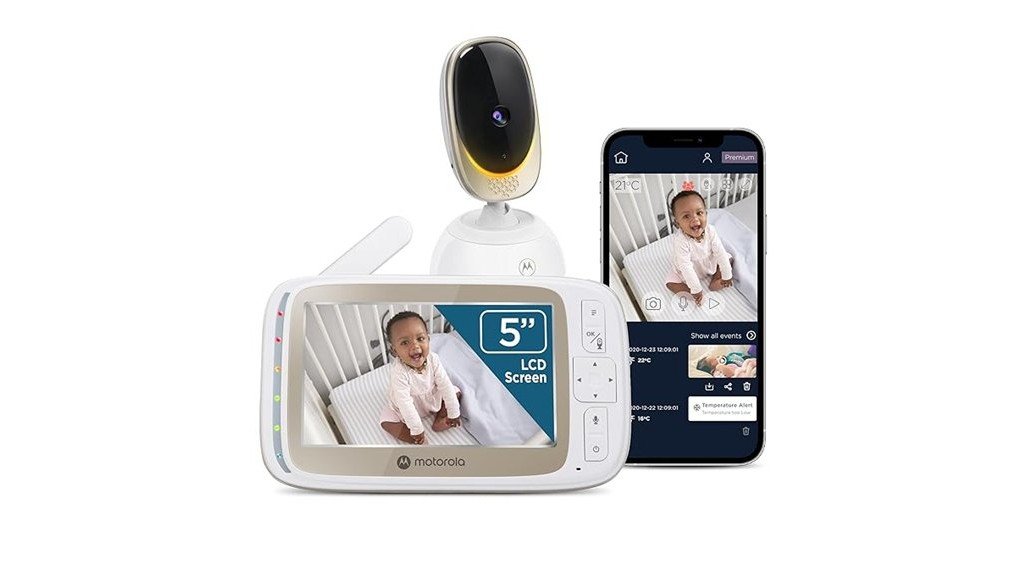
The Motorola Nursery WiFi Video Baby Monitor stands out with its impressive HD video quality and a 5-inch parent unit, ensuring clear visuals. It integrates seamlessly with the Motorola Nursery App, allowing remote monitoring and control. The monitor features remote pan, tilt, and zoom capabilities, enhancing coverage of large areas. Additionally, two-way talk and built-in lullabies facilitate communication. While users have observed some connectivity challenges, the overall functionality offers valuable support for parents. What other features make this monitor a remarkable choice?
Key Takeaways
- The Motorola Nursery WiFi Video Baby Monitor offers HD video quality, ensuring sharp visuals for effective monitoring.
- It features remote pan, tilt, and zoom capabilities, providing extensive coverage of your baby’s room.
- Advanced encryption and strong password protection enhance data privacy and security for parents.
- The monitor includes two-way talk and built-in lullabies, fostering communication and aiding sleep routines.
- Users report occasional connectivity issues and notification delays, impacting overall app usability experiences.
Key Features of the Motorola Nursery WiFi Video Baby Monitor
When considering a baby monitor, the Motorola Nursery WiFi Video Baby Monitor stands out due to its array of key features designed to enhance parental peace of mind.
It offers HD video quality, ensuring sharp visuals that allow parents to monitor their baby effortlessly.
With a 5-inch parent unit and the Motorola Nursery App, monitoring accessibility is seamless, whether at home or on the go.
The 5-inch parent unit and Motorola Nursery App ensure effortless monitoring, keeping you connected to your baby wherever you are.
Remote pan, tilt, and zoom functionalities provide extensive room coverage, while advanced encryption safeguards data privacy.
These features collectively create an environment where parents can feel liberated, knowing they can stay connected with their child anytime, anywhere.
How to Set Up the Motorola Nursery App for Effective Monitoring
Setting up the Motorola Nursery App for effective monitoring involves several straightforward steps designed to guarantee top functionality.
Begin with app installation, available on both iOS and Android platforms. After downloading, create an account and securely link the app to your monitor via WiFi.
For ideal performance, follow monitoring tips such as adjusting video settings for clarity and enabling sound notifications.
Customize alerts for motion and temperature changes to guarantee peace of mind.
How Secure Is Your Baby Monitor?
Understanding the security of a baby monitor is essential, especially for parents concerned about their child’s safety. The Motorola Nursery WiFi Video Baby Monitor emphasizes data privacy through advanced encryption standards. Parents can feel liberated knowing their child’s monitoring is secure.
The Motorola Nursery WiFi Video Baby Monitor ensures advanced encryption, giving parents confidence in their child’s safety and data privacy.
- Strong password protection for easy setup
- Real-time encryption guarantees data privacy
- Regular software updates enhance security
These features collectively contribute to a reliable monitoring experience. By prioritizing security, this baby monitor not only safeguards sensitive information but also fosters peace of mind for caregivers, allowing them to focus on what truly matters—nurturing their child.
How Two-Way Talk and Lullabies Enhance Communication With Your Baby
Two-way talk and built-in lullabies greatly enhance communication between parents and their babies, creating a nurturing environment even from a distance. This feature fosters bonding moments, allowing parents to soothe their infants with their voices, reinforcing emotional connections.
Additionally, the lullabies support consistent sleep routines, helping babies shift smoothly into slumber. By actively engaging with their child through audio, parents can intervene during restless nights or simply share comforting words, promoting a sense of security.
The seamless integration of these features not only aids in daily monitoring but also enriches the overall parenting experience, empowering families to stay connected.
User Feedback: Pros and Cons
When evaluating the Motorola Nursery WiFi Video Baby Monitor, user feedback reveals a balanced perspective, highlighting both its advantages and drawbacks.
Many users appreciate the high-definition video and the secure WiFi connection, enabling seamless monitoring. However, some experiences indicate frustrations with connectivity issues and occasional lag.
- Pros:
- Clear HD video with remote pan, tilt, and zoom.
- Secure WiFi with advanced encryption for privacy.
- Two-way talk and lullabies enhance communication.
- Cons:
- Connectivity problems reported by some users.
- Occasional delays in notifications.
- App usability can be inconsistent.
Frequently Asked Questions
Can the Monitor Be Used Without Wifi?
The monitor cannot function without WiFi, limiting user experience. Its advanced monitor features rely on this connection for notifications and HD video access, emphasizing the necessity of a stable network for effective usage and peace of mind.
What Is the Battery Life of the Parent Unit?
Like a reliable companion, the parent unit’s battery performance lasts several hours on a full charge, offering various charging options. This guarantees peace of mind and freedom to monitor without constant concern for power availability.
Is the Monitor Compatible With Other Devices?
The monitor offers extensive device integration, allowing seamless app functionality across smartphones and tablets. This compatibility empowers users to stay connected effortlessly, enhancing their freedom to monitor their baby from various devices with ease.
How Far Can the Parent Unit Be From the Camera?
The monitor range typically extends up to 300 feet indoors, depending on signal strength and obstacles. This distance allows caregivers to maintain connection and freedom while ensuring their child’s safety is not compromised.
Does It Support Multiple Cameras for Different Rooms?
Yes, it supports multiple cameras for different rooms, allowing flexible camera placement for thorough room coverage. This feature empowers caregivers to monitor various spaces seamlessly, enhancing their ability to stay connected and informed.
Conclusion
To conclude, the Motorola Nursery WiFi Video Baby Monitor stands out as a modern parenting tool, blending advanced features with user-friendly functionality. While it may face minor connectivity challenges, its HD video quality, remote capabilities, and two-way communication create an all-encompassing monitoring experience. Much like a trusted lighthouse guiding ships through fog, this monitor offers parents peace of mind in their caregiving journey, ensuring they remain connected to their little ones even from a distance.