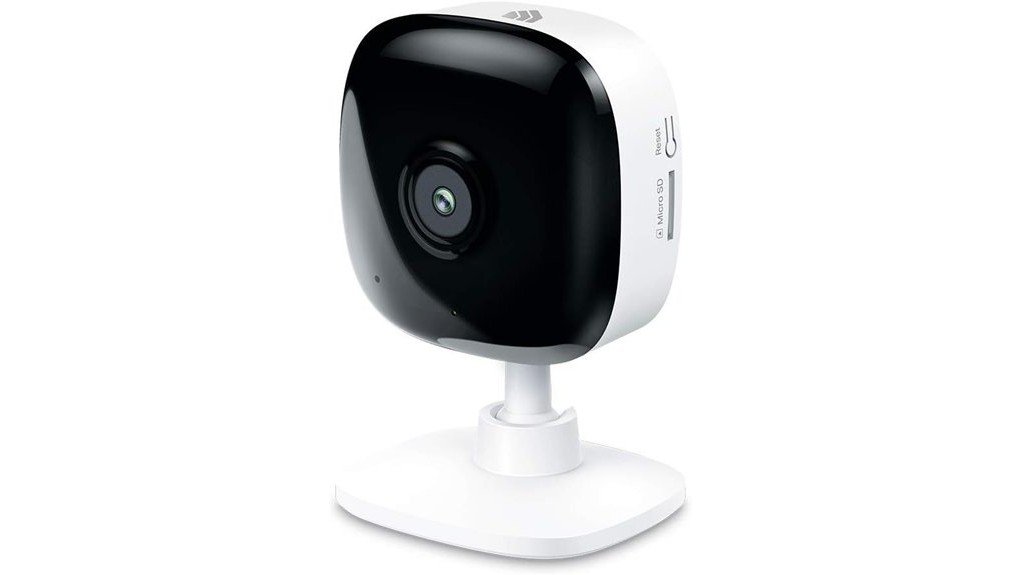
The Kasa 1080p Indoor Wired Security Camera stands out in the domain of home surveillance with its 1080p HD resolution and effective night vision, ensuring clear visuals around the clock. It features customizable motion detection alerts, allowing users to tailor notifications to their needs. Additionally, the camera supports both cloud and local MicroSD storage options. With straightforward installation and compatibility with Alexa and Google Assistant, it promises convenience. But how does it compare to other options on the market?
Key Takeaways
- The Kasa 1080p Indoor Wired Security Camera offers excellent video clarity with 1080p HD resolution and effective night vision for low-light conditions.
- It features customizable activity zones, allowing users to focus monitoring on specific areas for enhanced security.
- Users appreciate the seamless integration with smart home devices, including Alexa and Google Assistant for voice control.
- The camera supports both cloud and local storage options, accommodating up to 64 GB with MicroSD cards for versatile recording.
- Real-time motion detection alerts enhance security, making it a reliable choice for home monitoring, baby, or pet surveillance.
Why Choose the Kasa 1080p Indoor Wired Security Camera?
When considering a security solution for the home, the Kasa 1080p Indoor Wired Security Camera (EC60) stands out as a versatile option due to its multifaceted functionality. It serves not only as a home security device but also as a baby monitor and pet camera.
With an affordability comparison to other models, it offers competitive pricing without sacrificing quality. For ideal performance, installation tips suggest positioning the camera in a well-lit area with a stable Wi-Fi connection.
Its 1080p HD resolution and night vision capabilities guarantee clear surveillance, empowering homeowners to monitor their spaces effectively and confidently.
Top Features of the Kasa Camera for Home Security
The Kasa 1080p Indoor Wired Security Camera boasts several standout features that enhance home security and surveillance.
Its functionality includes:
- Motion Detection: Real-time alerts notify users of any detected movement, ensuring timely responses.
- Cloud Storage: Optional cloud storage provides secure access to video history, safeguarding important footage.
- Activity Zones: Users can customize up to four zones for targeted monitoring, focusing on specific areas of concern.
These features combine to create a thorough security solution, empowering users to maintain control over their home environment while enjoying the reassurance of advanced technology.
Kasa 1080p Camera vs. Other Security Cameras?
How does the Kasa 1080p Indoor Wired Security Camera stack up against other security cameras on the market?
The Kasa camera boasts distinct advantages, including 1080p HD video quality and customizable activity zones for targeted monitoring, setting it apart in a competitive landscape.
Unlike some rivals, it offers local storage options via a MicroSD card (up to 64 GB) and integrates seamlessly with smart home systems like Alexa and Google Assistant.
Competitor comparisons reveal that Kasa’s combination of features, such as night vision and real-time alerts, positions it as a compelling choice for those seeking both security and convenience.
How to Set Up Your Kasa Camera
Setting up the Kasa 1080p Indoor Wired Security Camera is a straightforward process that can enhance home monitoring considerably.
Setting up the Kasa 1080p Indoor Wired Security Camera is simple and significantly improves home security.
To guarantee peak performance, consider these installation tips:
- Choose the Right Location: Position the camera at eye level, ideally in a corner for maximum coverage.
- Secure Power Source: Verify the corded power connection is safe and easily accessible.
- Connect to Wi-Fi: Follow the app instructions to link the camera to your home network, ensuring a stable connection.
Effective camera placement and proper setup will result in seamless surveillance, empowering users to maintain a secure environment effortlessly.
User Feedback on the Kasa EC60
User feedback on the Kasa 1080p Indoor Wired Security Camera (EC60) highlights its practical applications and user-friendly features, making it a popular choice among homeowners. Many users appreciate the clear 1080p video quality and versatile functionality as both a baby monitor and security device. However, some report installation challenges, particularly with Wi-Fi connectivity.
| Feature | Positive Feedback | Installation Challenges |
|---|---|---|
| Video Quality | Excellent clarity | Initial setup complexities |
| User Experience | Easy app navigation | Wi-Fi signal issues |
| Motion Detection | Real-time alerts | Zone customization difficulties |
| Voice Control | Integrates well with Alexa | Limited compatibility |
| Storage Options | Flexible choices | MicroSD setup confusion |
Frequently Asked Questions
Does the Kasa Camera Work Without Wi-Fi?
The Kasa camera requires Wi-Fi for full functionality; however, it offers limited local storage options as a wireless alternative. Users seeking liberation from connectivity constraints may find this limitation restrictive for continuous monitoring.
What Is the Warranty Period for the Kasa Camera?
The warranty period for the Kasa camera spans two years, providing users a safeguard for their investment. This peace of mind complements the device’s high video quality while respecting user privacy in every enchanting moment captured.
Can I Access Live Footage Remotely?
Remote viewing is supported, allowing users to access live footage from anywhere. This feature enhances security, providing peace of mind and the freedom to monitor one’s home continuously, regardless of location or circumstance.
Is the Kasa Camera Suitable for Outdoor Use?
The Kasa camera is not suitable for outdoor use due to its lack of outdoor durability and weather resistance. Users seeking liberation in reliable security options should consider alternatives designed specifically for outdoor environments.
How Do I Reset the Kasa Camera to Factory Settings?
To reset the camera to factory settings, hold the reset button for about 10 seconds. This camera troubleshooting tip guarantees a fresh start, facilitating new configurations and enhancing user experience through the factory reset process.
Conclusion
In conclusion, the Kasa 1080p Indoor Wired Security Camera stands out for its blend of advanced features and user-friendly design. While its 1080p HD resolution and night vision capabilities guarantee clear monitoring around the clock, the customizable motion alerts and flexible storage options cater to various needs. Compared to other security cameras, the Kasa camera offers both affordability and functionality, making it a practical choice for homeowners seeking reliable surveillance without compromise.